Integrating Guide with PagerDuty
Automatically sync your engineering team’s on-call schedules from PagerDuty so interviews aren’t scheduled during on-call hours
Written By Troy Sultan
Last updated 7 months ago
🔧 What This Integration Does
When you connect PagerDuty to Guide, we’ll automatically sync your engineers’ on-call schedules and convert them into interviewer-specific blocked dates. These blocks appear in Guide’s scheduling engine and prevent interviewers from being booked during their on-call windows.
This saves time and reduces the need for secondary calendar workarounds.
⚙️ How to Connect PagerDuty
Go to Settings → Integrations in Guide
Under PagerDuty, paste your PagerDuty API Key
Click Connect
✅ Once connected, Guide will automatically pull all on-call schedules nightly from PagerDuty.
🧠 What Happens After Connecting
For each Guide user who matches a PagerDuty schedule:
Their on-call shifts will appear as blocked dates in scheduling
These blocks will automatically show up in the Guide calendar view during scheduling
You’ll also see the schedule name (e.g. “Platform On-Call”) attached to each blocked period
🗓️ How It Looks During Scheduling
When scheduling a candidate:
Search and add the interviewer like normal
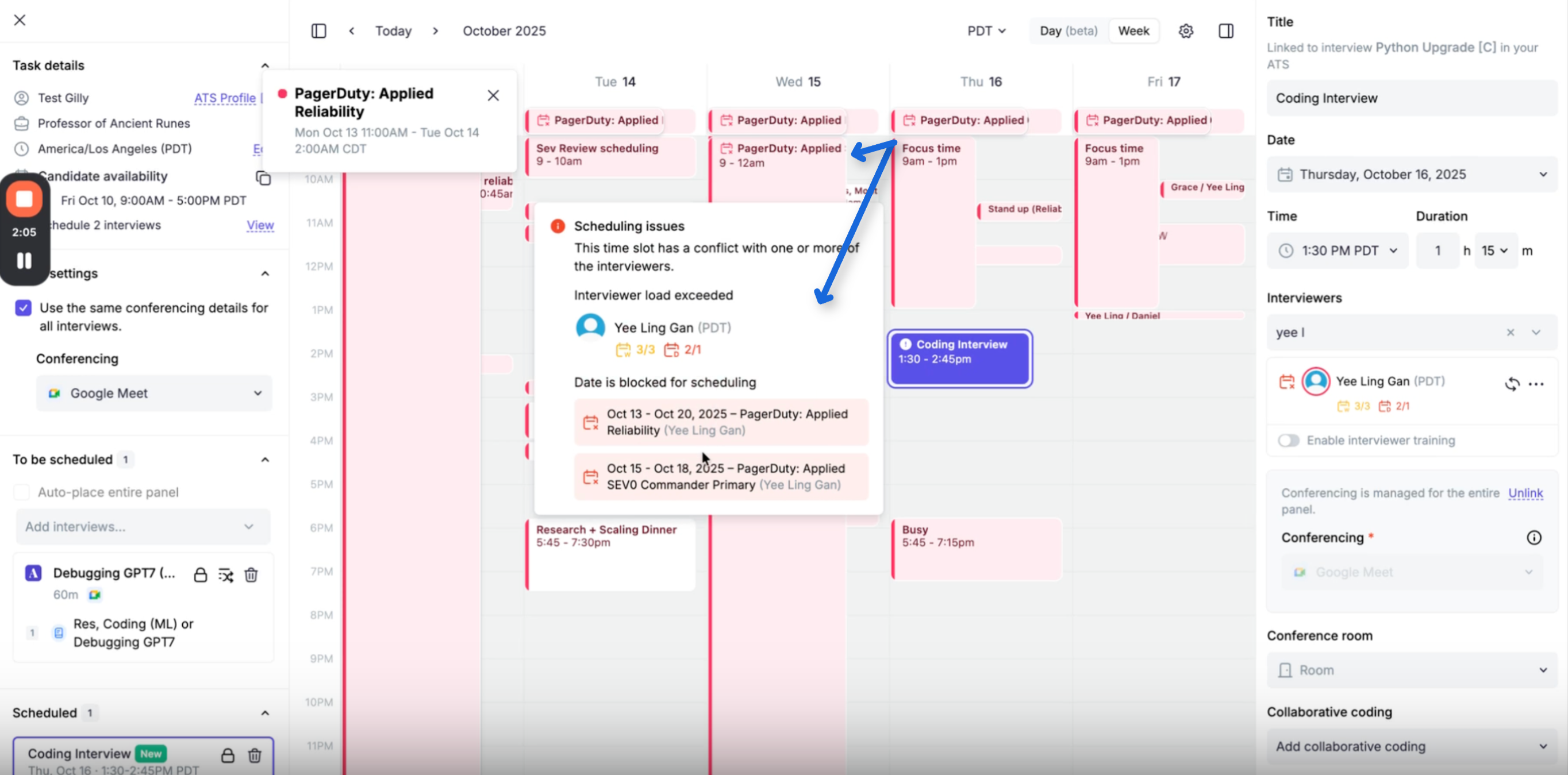
If the interviewer is on-call for the selected time:
A warning banner will appear
The time block will be grayed out or unavailable
You’ll see the schedule name as the reason for the conflict
📌 E.g., “Blocked – PagerDuty: Backend On-Call”
🔁 Migrating from Secondary Calendars
If your team was previously using secondary availability calendars (like synced PagerDuty Gcal feeds), you can now remove those.
🧹 Removing these avoids duplicates or overlapping conflicts in the scheduling interface.
You can:
Ask interviewers to remove their secondary calendars themselves
Or contact Guide Support to bulk-clear secondary calendar settings for your team
✅ Summary
With this integration, Guide automatically prevents on-call engineers from being booked for interviews — no manual updates or extra calendars required.
If you need help connecting PagerDuty or cleaning up old calendar settings, contact support and we’ll help you get set up.